I. Governance & Administration
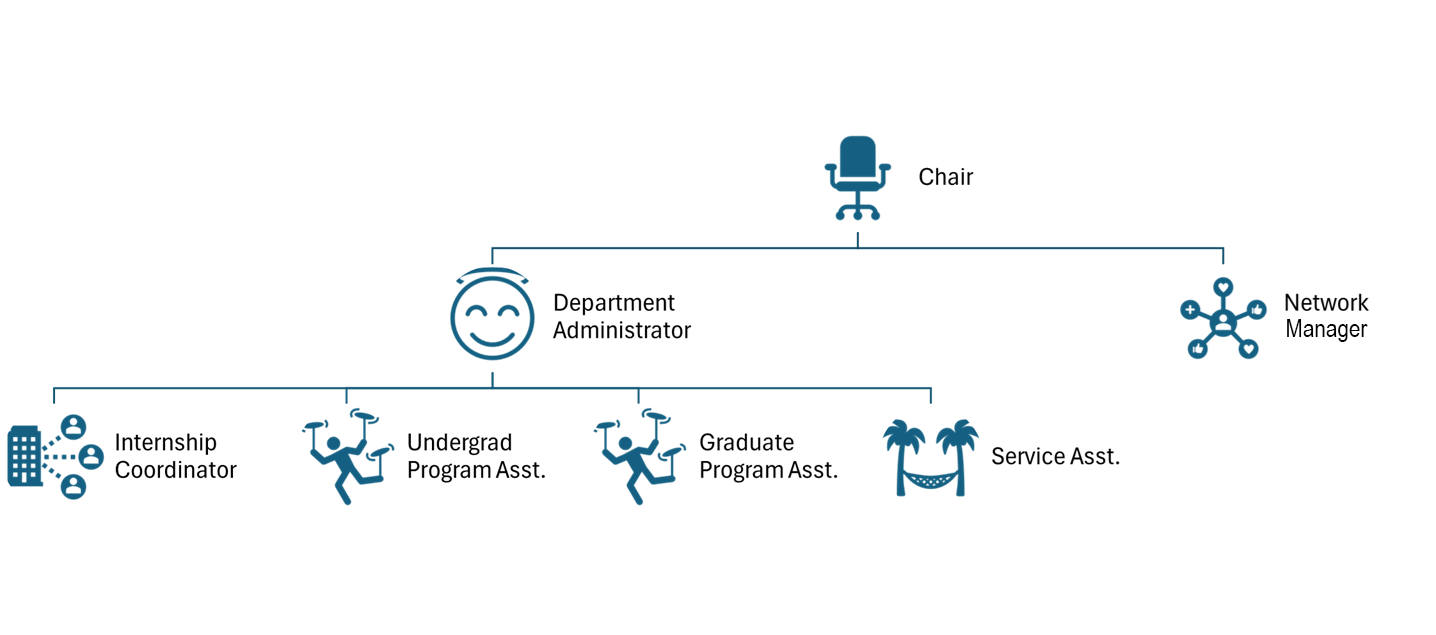
This section outlines the department's foundational structure and the essential administrative resources available to personnel. It includes the organizational chart and defined areas of responsibility for staff and faculty leadership, ensuring that roles are transparent and communication channels are clear. Additionally, this section outlines the logistics for physical and digital access, including keys, proximity cards, and a directory of key contact information.
Committee Membership 2026-2027
| Committee | Members |
|---|---|
| Department Assembly | Voting members: all CUFA members (not including Department Chair), ACUMAE member Department Administrator, CUPEU members Network Administrator and Internship Coordinator, CUPFA rep, CUSSU members Graduate Program Assistant, Service Assistant and Undergrad Program Assistant; 1 student rep from Geography Undergrad Student Society (GUSS), 1 student rep from Urban Planning Association (UPA), 1 student rep from graduate research programs, 1 student rep from graduate professional program |
| Department Curriculum Committee (DCC) | Matthews (ex officio), Mulrennan (GPD MEnv), Mohabir (UPD GEOG), Caquard (GPD MSc & PhD), Lesnikowski (UPD URBS), Freeman (CUPFA) |
| Department Ethics Committee (DEC) and members of the College of Ethics Reviewers (CER) (regarding GPE student research) | Mulrennan, Gould |
| Department Personnel Committee (DPC) | Mohabir (Year 2), Matthews (ex officio), Townsend (Year 1), Akbulut (Year 2), de la Llata (Year 2) |
| Department Tenure Committee (DTC) | All GPE Tenured Faculty Members |
| EDI Committee | Rantisi, Turner |
| Graduate Program Committee (MSc/PhD) | Rutland, Caquard (GPD MSc & PhD), St-Jacques |
| Graduate Program Committee (MEnv) | Caquard, Mulrennan (GPD MENV), Turner, Biron |
| Part-time Hiring Committee | Matthews (ex officio), Kross (CUFA), Buskard (CUPFA), Townsend (CUFA), Freeman (CUPFA) |
| Seminar Series Coordinator | Ghaffari, Baril |
| Climate Emergency Committee (CEC) | Jaeger, student committee members |
| GPE Awards Committee | Townsend, Rantisi, Matthews |
| Space Committee | Grad Student Rep (TBD), Matthews, Volpe-Standing, Network Administrator, de la Llata (CUFA member) |
Faculty Administrative Positions
- Chair: Dr. Damon Matthews
- Undergraduate Program Director and Advisor (Environmental Geography, Environmental and Sustainability Science, Human Environment, and Geospatial Technologies): Dr. Nalini Mohabir
- Undergraduate Program Director and Advisor (Urban Planning and Urban Studies): Dr. Alexandra Lesnikowski
- Graduate Program Director (MSc, PhD): Dr. Sébastien Caquard
- Graduate Program Director (MEnv and Graduate Diploma): Mulrennan (Graduate Program Director), others TBA June 2026
Organizational Chart
Prox Cards and Keys
Prox cards (access cards) are used for H1254 (Reading Room/GIS Lab), ER1428 (equipped teaching room), and ER1442-15 (Urban Planning Studio). Students now receive ID cards which can be programmed to be used as access cards, so access cards are no longer needed for students. To order your own or to request keys, use the online forms provided below:
Faculty Key Order Instructions
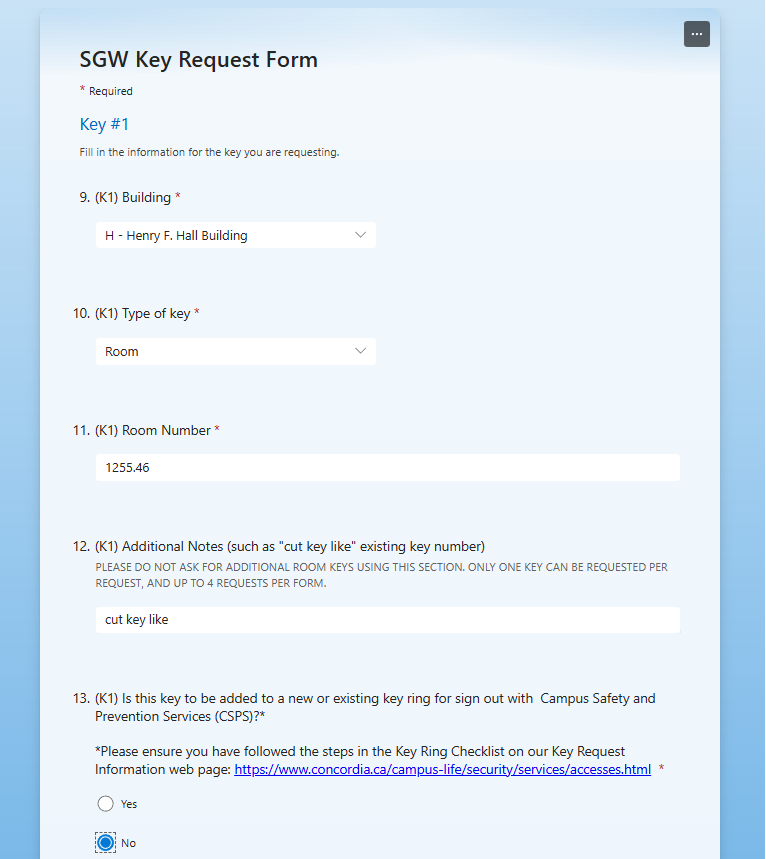
The form for ordering keys via Concordia Security requires specific information for questions 9 through 15. Follow the online form prompts until Question 9, then use these responses (click image for more details):
- Question # 9 (K1 Building) = H - Henry F. Hall Building
- Question # 10 (K1 - Type of Key) = Room
- Question # 11 (Room #) = 1255.46 or office assigned assigned by chair
- Question # 12 (Notes - Key Cut like) = H 1255 Office Suite
- Question # 13 (Key ring) = No
- Question # 15 (Authorizer) = Tanya Volpe-Standing
Then follow the remaining prompts and submit the request. Key processing can take 2 to 4 weeks depending on demand; the department suggests submitting requests as soon as possible.
↑ Back to TopStaff Members and Areas of Responsibility
administrator.gpe@concordia.ca | 514-848-2424, ext. 5646 | Room H-1255.23
Work Hours: Mon-Fri 09:30-17:30 – Thursdays remote
- Day-to-day administration of GPE; policies and procedures; course scheduling
- Preparing materials for PTHC meetings; answering part-time teaching application queries
- Budget administration and payroll; assistance to faculty with expense claims and UNITY
- Contracts (CUPFA, CREW); troubleshooting student issues and grant issues
- Complaints and conflict resolution; work assignment and supervision of GPE staff
- TA/Faculty relations; Assistant to the Chair; Department space administration
- Entering curriculum changes; preparing minutes and documents for departmental meetings
M.Burelli@concordia.ca | 514-848-2424 ext. 2060
Work Hours: Mon-Fri 9:00-17:00
- All computer and network related issues
- All geospatial equipment: maintenance, training, and loans
- Support in teaching GIS; Reading Room/GIS; Department website
Menv.internship@concordia.ca | 514-848-2424 ext. 2048
Work Hours: Mon-Thurs 08:15-16:15 – Thursdays remote
- Master of Environmental Assessment (MEnv) graduate student internship placement and supervision
- Liaising with current, former, and potential internship partners
- Organizing and evaluating internship report presentations
- Designing and running ENVS 608: “Getting Ready for EA Internship”
Jennifer.Srey@concordia.ca | 514-848-2424 ext. 2051
In Office: Tue & Wed | Remote: Mon, Thurs & Fri
- Graduate student application, admission, and registration
- Graduate student requests; TA contracts
- Keeping records of graduate supervision and committee membership
- Assisting GPDs with new student orientations
Marilyn.malofy@concordia.ca | 514-848-2424 ext. 2446
Work Hours: Mon-Fri 07:45-15:45 – Fridays remote
- Undergraduate registration, course overrides, and student requests
- Undergraduate program audits; course outlines collection
- Exam coordinating and department liaison for the Exams Office
- Collecting signatures/documents for student requests and Honours programs
- Assisting UPDs with new student orientations
geogplanenviro@concordia.ca | 514-848-2424 ext. 2050
Work Hours: Mon-Fri 08:00-16:00 – Mondays remote
- Receiving and redirecting inquiries; blast email distribution
- Troubleshooting office equipment and facilities issues (Tickets)
- Office supplies; key requests; room bookings for GPE teaching spaces
Useful Links and E-mail Addresses
↑ Back to TopII. Instructional & Classroom Management
The procedures in this section are designed to support the seamless delivery of courses and the effective management of the learning environment. From establishing course outlines and maintaining office hours to using digital platforms such as Moodle and SIS, these guidelines ensure consistency in instructional standards. This section also details the protocols for room changes and the necessary steps for cancelling or rescheduling classes to minimize disruption to the academic calendar.
Cancelling Classes
Should the need arise to cancel your class, log onto your portal as soon as possible to send an email to your class, and speak to or leave a message for the Chair and Department Administrator. If it is a last-minute cancellation for an 08:45 class, please also leave a message at ext. 2050.
↑ Back to TopCopying and Computing
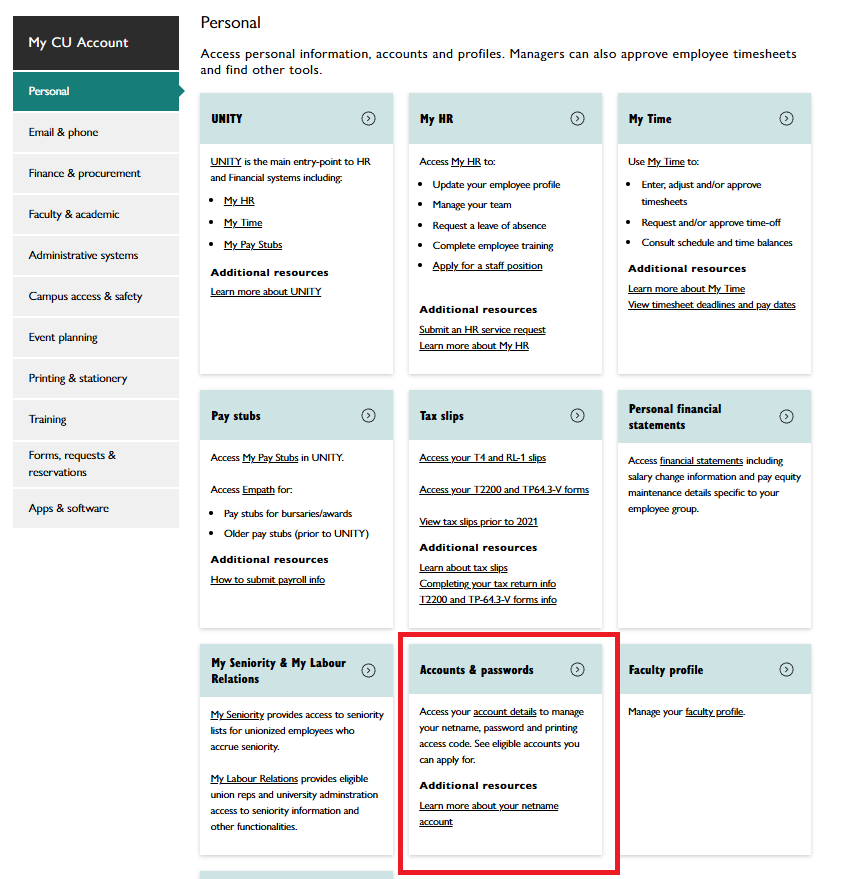
Each faculty and staff member is assigned a copier code; you may request two or more if you wish to separate research use from teaching. If you have forgotten your code, visit Carrefour > My CU Account > Personal > Accounts and Passwords.
If you are a new user, please inform the Administrator of your code so it can be activated. Remember that the second side of a double-sided copy counts as a second page due to toner costs. Please make every attempt to avoid unnecessary photocopying by utilizing Moodle. Photocopying should ideally only be used for in-class midterm exams, quizzes, or field-related documents.
Your Netname and password will log you into any teaching or office computer in the University. Should you encounter any computing or IT problems, please initiate a ticket:
In an emergency, you may visit the Network and Geospatial Technologies Manager in person, but please follow up with a ticket.
↑ Back to TopCourse Outlines
During the first week of classes, every student must receive a course outline for each course in which they are registered. This can be a hard copy and/or (preferably) a digital copy made available on Moodle, in conjunction with a PowerPoint presentation of the outline during the introductory class. This latter practice saves paper and aligns with the sustainability goals of the department.
- 200-level Grading: The department policy of limiting "A" range grades in 200-level courses to a maximum of 25% of the class must be clearly stated.
- Curving & Partitioning: If you intend to reserve the right to curve final grades, state this explicitly. Likewise, the partitioning of grades (e.g., "20% for the midterm") should be discussed, including the scheme for translating point grades into letter grades.
- Attendance: If you require attendance, indicate this on the outline and maintain an attendance sign-in sheet.
- Detail: Your outline should be as comprehensive as possible. Percentage weights and deadlines for assignments, midterms, and papers must be explicitly listed.
- Deadlines: A copy of your outline must be sent to the Undergraduate Program Assistant one week before the first class.
Undergraduate/Graduate Cross-listed Courses
If you are teaching a 400-level course cross-listed as a graduate 600-level course, you must prepare two separate course outlines. Expectations for graduate students should be higher. Remember that the grading scale for graduate students is different (only A+ through C, and F; no C+, C-, or D range).
Front Page of Course Outlines
The University requires general points of information on the front page. The Chair or Undergraduate Program Assistant will prepare a template and email it to you two weeks before the term begins. Details of your office hours and contact information should also be clearly indicated.
↑ Back to TopMakeup Classes
If you are cancelling a class and need to schedule a makeup session, please contact Carol Plathan at 514-848-2424 ext. 2620. Have the course name, number, section, day, and time ready.
↑ Back to TopMoodle
Moodle is the Concordia-supported Learning Management System (LMS), a secure online space to post content, engage in learning activities, and facilitate class communications.
Moodle courses are automatically created before the beginning of a semester. Instructors and students are added to the sites by an automatic process. Moodle can be accessed by visiting Carrefour or moodle.concordia.ca. For more information on accessing Moodle, refer to the links below:
Office Hours
The front office is open Monday to Friday from 9:00 to 17:00. Please visit the front desk well in advance of closing time if you have inquiries or require assistance.
Faculty Office Hours
Faculty members are required to hold regular in-person office hours for students at least once per week. If for any reason you are unable to keep scheduled office hours, please inform the Department Administrator by phone. Note that while there are no set office hours after the exam period for a particular course, faculty must be available to students on an ad hoc basis; it is the student’s right to review their exams with their professors. Students may also need to speak to professors after the course has ended if they are dissatisfied with their grade and wish to understand their performance. This discussion could be the prelude to a formal re-evaluation request.
↑ Back to TopRoom Changes - Inside the Department
Our internal rooms H1252, H1269-3, H1267, H1271, ER1428, and ER1442-15 are scheduled for classes daily. However, ad hoc bookings for events, meetings, or defenses are permitted. Please use our booking page:
↑ Back to TopRoom Changes - Outside the Department
Contact Scheduling (Carol Plathan) at 514-848-2424 ext. 2620. Room changes related to changing enrollment are automatically tracked and accommodated throughout the registration period.
↑ Back to TopSIS
SIS (Student Information System) & Class Rosters
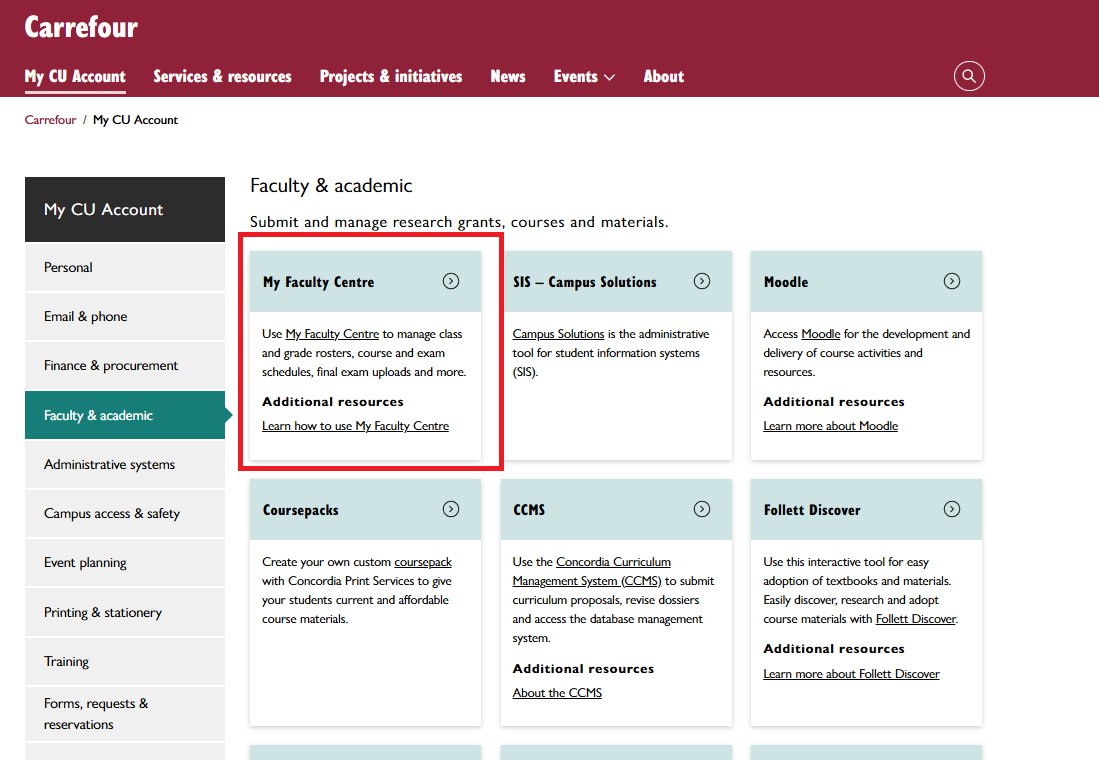
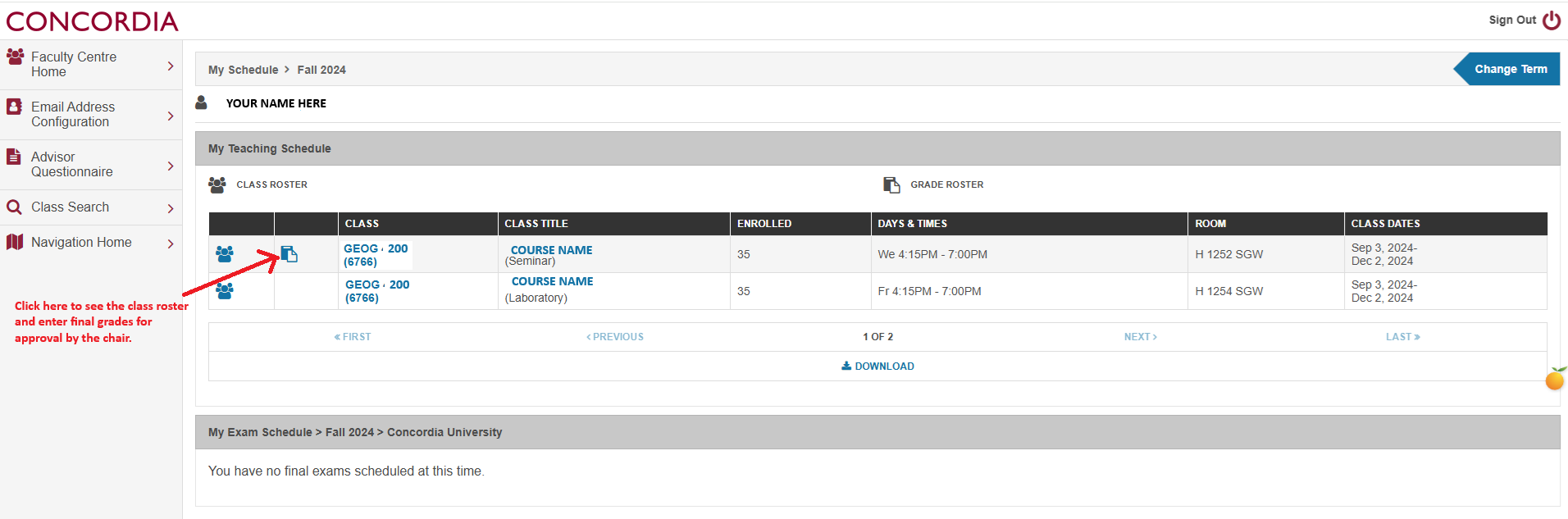
This is accessed through Carrefour (My Faculty Centre) or My CU Account (Faculty & Academic -> My Faculty Centre) and allows you to access course and class information, including your student class list (known as the Class Roster). The pertinent selection for faculty members is "My Faculty Centre". To access your class list, click on the tab for the appropriate term, then click on the "Class Rosters" tab. Your classes for that term will be listed. Click on the "people" symbol on the left side of the line where the class is listed. The list generated is the most current list available. This application has the option to send your class an email with two simple clicks. Unfortunately, you cannot send attachments through this system, but you can copy and paste the email addresses into your own email program.
↑ Back to TopGrade Submissions
Grade Submission via SIS
Grades are submitted electronically via "My Faculty Centre". Your Grade Roster (distinct from the Class Roster) is available through a process identical to the Class Roster. Posting your grades on Moodle only serves to report grades to your students; grades are only official once they are sent to the Chair for approval and posted to the student’s record via My Faculty Centre. When grades are entered, please click “Save” and then change the tab to “Submit for Review“ (this final step sends the grades to the Chair for approval).
Final grades must be submitted no later than seven calendar days (3 calendar days for potential graduating students) after the scheduled final examination. Alternatively, where there is no final examination, grades must be submitted seven calendar days (3 calendar days for potential graduating students) after the last scheduled class. In the event of a take-home exam, grades are due seven calendar days (3 calendar days for potential graduating students) after the last University-scheduled exam. (Note: The acronym used by the University for potential graduating students is “Pot Grads”). Pot Grads will appear on a separate Grade Roster from the rest of the class so that you can process them quickly. Please complete the grading for your Pot Grads first.
View Screenshots
III. Academic Evaluation & Grading
This section governs the lifecycle of student assessment, providing a standardized framework for the submission, grading, and retention of academic work. It covers the technical and administrative requirements for processing exams—including multiple-choice coordination—and the specific protocols for grade submissions and subsequent changes. Faculty will also find guidance here on managing specialized notations, such as IP notations for graduate students, and the implementation of course evaluations.
Assignments – Submission, Distribution, & Retention
- Submission: Students submit work in class, in mailboxes, or electronically; admin staff does not date-stamp or monitor submissions.
- Returning: Efforts should be made to return work in class or online within one week.
- Retention: Student work (primarily exams) must be kept for one full academic year (3 terms). Outdated materials should be shredded.
- Models: If requiring models (maquettes), ensure low environmental impact materials are used and stored neatly.
Graduate Grading Scheme - (IP) Notation
The In Progress (IP) notation is used when a student, who has completed a substantial portion of the course, cannot complete the course in time for reporting grades due to circumstances beyond their control. This notation may be assigned only to individual students, not to entire classes. The IP notation is only used in combination with a valid course grade (e.g. "B/IP", "F/IP"). The grade is assigned on the basis that the missing work is graded as zero and included in calculating the overall grade. Students must complete courses with IP notations by the DNE deadline of the following term or the Fall DNE deadline for Summer term courses (see Academic Calendar for precise dates). If the course is not completed, the IP notation will be removed at the DISC deadline and an INC notation will be recorded along with the grade and the grade will become the permanent grade. If the course is completed after the DNE deadline the grade will not be changed (e.g. "B/INC", "F/INC"). The Incomplete (INC) notation is used to indicate that the student did not complete the required work for the course.
Under exceptional circumstances an additional period of In Progress Extension (IPE) may be granted. Requests for an IPE notation should be submitted as a student request with the GPA, supported by relevant documentation including confirmation of the instructor’s support for a further extension prior to the DNE deadline.
| Academic Term | IP Deadline for student to submit outstanding work | IP Deadline for professor to submit final grade | IPE Deadline for student to submit outstanding work | IPE deadline for professor to submit final grade |
|---|---|---|---|---|
| Summer | DNE of Fall Term | DISC of Fall Term | December 15 of Fall Term | End of Fall Term |
| Fall | DNE of Winter Term | DISC of Winter Term | April 15 of Winter Term | End of Winter Term |
| Winter | DNE of 1st Summer Term | DISC of 1st Summer Term | August 15 of Summer Term | End of Summer Term |
For additional information related to the graduate grading process consult the School of Graduate Studies Academic Regulations page
↑ Back to TopCourse Evaluations
- Full-Time: Evaluated electronically. Results are available via My CU Account.
- Part-Time: Evaluated via paper questionnaires. Faculty delegate a student to distribute and collect them and must step out of the room. Results are later available online.
Quantitative results are seen by both the faculty member and the Chair; qualitative comments are for the faculty member only.
↑ Back to TopExams
During the first week of classes, you must submit a list of courses requiring an exam scheduled by the Exams Office. Specify dates you are unavailable to invigilate and any specific needs (open-book, large space, etc.).
- Scheduling: No tests or examinations shall take place in class after the 11th week (due to the 12-week requirement).
- Scripts: Exam scripts must be submitted to the Exams Office by the deadline for free photocopying and transport. If missed, the professor is responsible for the cost and transport.
- Invigilation: Professors are expected to be present during final exams.
- Conflicts: Students with three exams back-to-back should contact the Exams Office. Midterm arrangements for individual students are at the professor's discretion.
Grade Changes
- Graduate: The professor completes a grade change form after notifying the GPD and GPA. Changes are possible within three terms. An "F" grade requires a Student Request to the School of Graduate Studies.
- Undergraduate: Done online through the Faculty Centre (except for cases of academic misconduct). It is recommended that the Department Administrator coach you through your first online grade change.
Grading
An A+ should be reserved for work that is truly outstanding. At the 200 level, no course should have more than 25% of final grades in the "A" range (A+/A/A-). This policy exists to prevent grade inflation. If you reduce grades to lower the number of As, all grades should be lowered by the same amount or according to a fair, transparent principle. The Department Chair may return grades to you for modification if they appear aberrant.
Undergraduate Grading Scheme (Default)
| Grade | Percentage | Description | GPA |
|---|---|---|---|
| A+ | 90-100% | Outstanding | 4.3 |
| A | 85-89% | Outstanding | 4.0 |
| A- | 80-84% | Outstanding | 3.7 |
| B+ | 77-79% | Very Good | 3.3 |
| B | 73-76% | Very Good | 3.0 |
| B- | 70-72% | Very Good | 2.7 |
| C+ | 67-69% | Satisfactory | 2.3 |
| C | 63-66% | Satisfactory | 2.0 |
| C- | 60-62% | Satisfactory | 1.7 |
| D+ | 57-59% | Marginal Pass | 1.3 |
| D | 53-56% | Marginal Pass | 1.0 |
| D- | 50-52% | Marginal Pass | 0.7 |
| F/FNS | <50% | Fail | 0 |
| R | <20% | Repeat | 0 |
Incomplete (INC) / In Progress (IP) Final Grade
While awarding an INC/IP grade is at the discretion of the professor, accommodations must be made if a student can prove compassionate or extenuating circumstances with supporting documentation.
Academic Re-evaluation (Graduate & Undergraduate)
Students have the right to request an academic re-evaluation if they claim a miscalculation occurred or the evaluation was demonstrably unfair. This is a last resort; students must first attempt to discuss the matter with the professor. If granted, the Chair assigns an alternate professor to re-evaluate the work. The new grade may be higher, lower, or remain the same.
↑ Back to TopIP Notations for Graduate Students
The In Progress (IP) notation is for students who cannot complete requirements due to extenuating circumstances. It is combined with a grade (e.g., "B/IP"). Work must be completed by the following term's DNE deadline, or the grade becomes permanent. If no grade/IP is assigned within seven days of the exam period, the grade becomes an "F". Consult the Graduate Program Assistant for extensions (IPE).
INC Notations for Undergraduate Students
If a student is allowed to complete work late, assign a grade (missing work = 0) plus the INC notation. Students must apply for Late Completion at the Birks Student Service Centre (fee of $25) by specific deadlines: Feb 1 for Fall; May 15 for Winter/Fall-Winter; and Sept 1 for Summer.
↑ Back to TopMultiple Choice Exam Processing - IITS
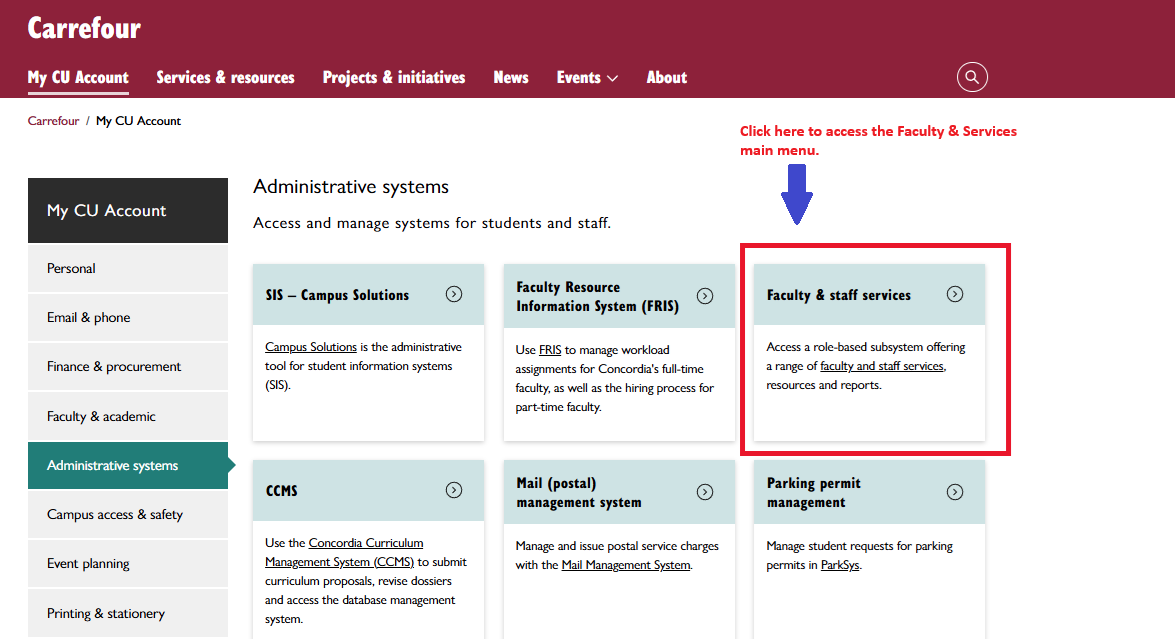
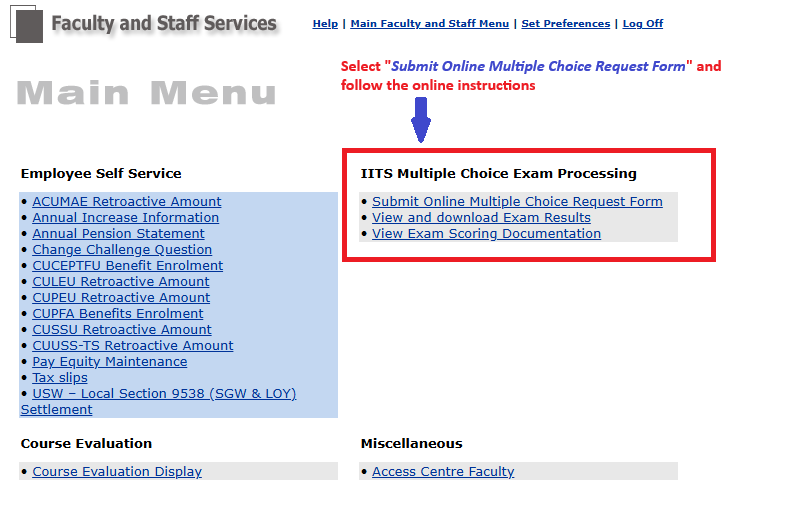
IITS provides marking services for multiple-choice exams. You must pre-book using the "Submit Online Multiple Choice Request Form" via Carrefour online profile, by clicking on the option "Faculty & staff services" and following the prompts. See the images for more details (click for larger views).
Optical scan sheets are in the front office. They are in the large black file cabinets and a copy of the scantron sheet is attached to the drawer.
View Screenshots
IV. Student Relations & Academic Integrity
This section focuses on maintaining a respectful and ethical academic community and addresses the complexities of the faculty-student relationship. It provides clear procedures for resolving conflicts and upholding the highest standards of academic integrity, including the management of plagiarism and misconduct. Furthermore, this section outlines the specific safety and administrative requirements for students engaged in fieldwork and other experiential learning opportunities.
Faculty-Student Conflict Resolution
Initial Direct Resolution: Provided there are no safety concerns, professors are encouraged to resolve minor academic or interpersonal misunderstandings through direct, professional dialogue with the student. If uncertain about how to proceed, they should first seek guidance from the Department Chair.
Academic Misconduct: If a dispute involves plagiarism or cheating, faculty must file an incident report rather than adjudicate penalties independently, sending the case to the Faculty's Code Administrator.
Seeking Institutional Support: When behavior violates the Code of Rights and Responsibilities (Behaviour guidelines), professors can consult confidentially with the Office of Rights & Responsibilities for informal mediation or formal complaint coordination.
Accessing Internal Resources: For responding to official complaints or grievances, faculty members can log into Carrefour for procedural guidelines or contact their respective department chairs and union delegates.
↑ Back to TopPlagiarism and Academic Misconduct
Submit incident reports to the Code Administrator, Dr. Anthony Noce. Professors cannot discuss the incident with the student; they only inform the student that a report was submitted. The Code Administrator will interview the student and decide on sanctions or refer the case to the Academic Hearing Panel (AHP).
↑ Back to TopStudents and Field Work
Professors have an obligation to keep students out of potentially dangerous situations. Activities involving human subjects (interviews, photos, etc.) must be approved by the Department Ethics Committee. Forms are available from the Service Assistant.
Photos
If photos of human subjects will be published, subjects must give consent via a waiver (available from the Department Administrator).
Class Field Trip Expenditures
Funds are available for excursions. Expenses must be approved by the Chair and processed by the Department Administrator, who will arrange transportation.
↑ Back to Top